
Now that some drupal.org projects are having their issue queues moved to Gitlab, this is probably a good time to start getting used to the new interface and all the new functionality.
This quicktip covers two important bits that I think most Drupal contributors will want to take note of.
Enable notifications
If you're an active contributor, then you probably depend on the email notifications that have been sent out by drupal.org when an issue that you're involved in or following has an update.
If you're expecting this to just work with Gitlab, you should probably be aware that by default, Gitlab notifications will be configured to be sent to a "no-reply.drupal.org" email address for your Drupal user account - in other words, you won't be getting any notifications.
You can easily change this by visiting https://git.drupalcode.org/-/profile/notifications and changing your Global notification email:
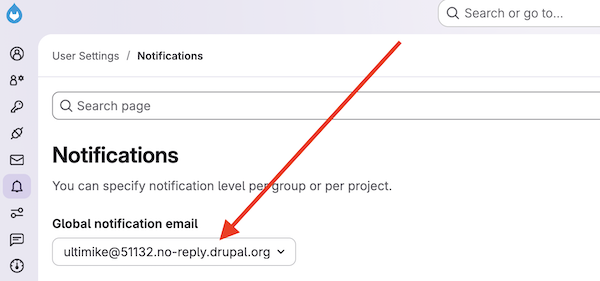
This page also has (much) more granular notification settings, but for most users, updating your Global notification email is a solid start.
Issue tracker page
I'm not exaggerating when I say that I check my personal Drupal issue tracker page every single day. It's a one-stop shop for seeing which of the Drupal issue queues I'm involved with or following have had updates to them. But, it only shows issues on drupal.org - not on Gitlab.
I haven't been able to find similar tracker page on git.drupalcode.org; the closest I can find is a filtered view of Work items that show issues that I'm explicitly subscribed to. I'm curious if there's anything better.
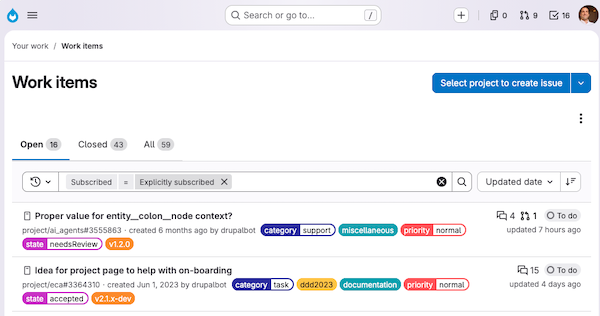
A significant downside (IMHO) of this Work items view is that it doesn't show me which issues have had updates since I last looked at them - this bit of functionality is a big time-saver on my personal Drupal issue tracker page.
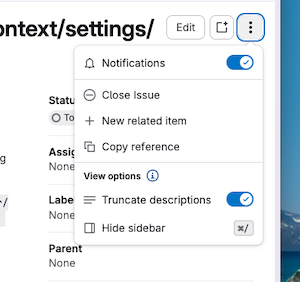
Also - and this is important - issues that you create do not automatically appear in this list. Currently, you have to toggle the issue's "Notifications" slider off, then back on in order to be "Explicitly subscribed" (otherwise, you are just implicitly subscribed?)
What else?
There's no doubt that moving Drupal issue queues to Gitlab will cause some friction as we all learn new processes and best practices emerge.
I'm curious to see what other features of the Drupal issue queues that we all take for granted will need to have their Gitlab equivalent discovered and integrated into our normal workflows.
AI was not used in the authoring of the article.
Add new comment