
Update: July 18, 2026: this functionality is now part of the Drupal AI Dashboard module's documentation: https://project.pages.drupalcode.org/ai_dashboard/ecosystem/
While writing DrupalEasy's latest long-form training course, Responsible Drupal AI Basics (warning - we might change the name still!), I really wanted to make sure we covered all of the (currently) important modules in the Drupal AI module ecosystem. While there are a few manually curated lists of modules (and recipes) in the ecosystem, I found all of them either incomplete or out-of-date.
What I was looking for is some type of automated list of modules in the AI module eco-system that showed usage and maintainer activity: something that is sortable, filterable, and most importantly maintainable (and therefore up-to-date.) I couldn't find anything.
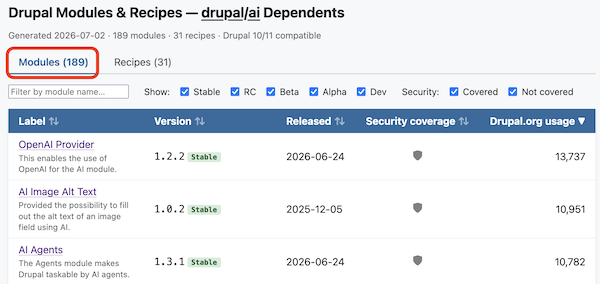
So, I decided to make one: https://ultimike.github.io/ai-module-usage/
Rather, I decided to have Claude Code make it for me.
This was new territory for me, as it was the first time that I used Claude Code starting from nothing. I didn't spin up a fresh Drupal site, I didn't do any initial research, I just set up a fresh DDEV environment (project type: generic), installed Claude Code (via https://github.com/FreelyGive/ddev-claude-code,) authenticated with Anthropic, and then started typing in /plan mode.
Initial goal: AI modules
The goal: a list of modules that had a dependency on the Drupal AI module. I wanted to see their names, usage numbers, latest version, and release date. Claude and I discussed it a bit, and I decided that I wanted to be as gentle as possible to drupal.org (I didn't want the script to have to look at every single module) and take into account any manually curated lists of modules that I may find. The two currently used sources are:
After a bit of back-and-forth, Claude created a Python script that searched all the sources, de-duplicated the results, and confirmed a dependency on the main Drupal AI module. Once complete, it then outputs a .json file of results.
I then had Claude create a second Python script that takes the output file and creates both a Markdown and HTML file of the results. The HTML version also includes sorting and filtering capabilities.
New goal: AI recipes
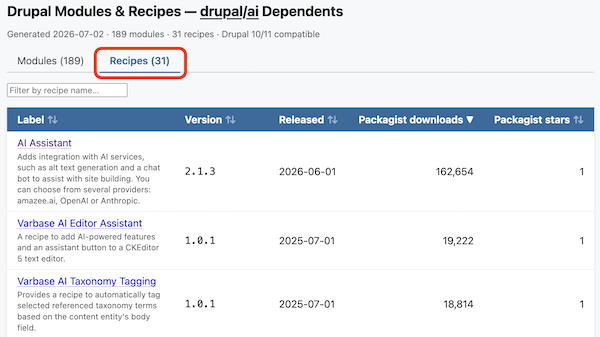
After being pretty proud of myself for my progress to this point, it dawned on me that I could probably do the same for AI-module related recipes. I took the same approach - I wanted to provide the script with one or more sources, and let it do the hard work of writing a script to search the sources, de-duplicate the results, confirm it is a Drupal recipe, and confirm the AI module dependency. Sources are currently:
- Any projects from above that didn't turn out to be modules.
- https://packagist.org/search.json?type=drupal-recipe&q=ai
- https://git.drupalcode.org/project/ai_dashboard/-/raw/1.0.x/ai_dashboard_recommended_recipes.yml (via the AI Dashboard module.)
I was especially excited about adding the recipe data because all Drupal recipes are exposed via packagist.org - therefore we have downloads and stars data that can be utilized in the data. Results are written to the same .json file as the modules.
The Python script to output the results as Markdown and HTML was updated to include the recipe data.
Initial feedback
Again at this point, I gave myself a little pat on the back (on behalf of Claude, as well), but had a nagging feeling that either I missed something obvious and/or there was some low-hanging fruit that could make the results even better.
So, I reached out to Martin Anderson-Clutz (mandclu) and asked his opinion. Martin quickly suggested that I add the security coverage data and also made some suggestions regarding the HTML output (all which I quickly had Claude address.) Thankfully, he didn't find any red flags with the logic that Claude and I employed to generate the data.
Minor refactoring
At this point, it was taking the script about 45 minutes to generate the .json file (generating the .md and .html files takes only a few seconds.) I purposely asked Claude to build in generous wait times between calls to drupal.org and packagist.org, but I figured I'd challenge Claude a bit and asked it to refactor the main script for speed. Not surprisingly, it did so, and now it takes around 37 minutes.
More feedback
I then shared it in the #ai channel of the Drupal Slack Workspace. Mauricio Dinarte (dinarcon) suggested a security coverage icon legend be added to the HTML version: done.
Rob Loach (robloach) opened up a couple of issues requesting additional information be added to the results and I've already merged one of his requests (and contribution!) to add short descriptions to each module and recipe.
What's next?
Honestly, I'm not sure. Right now, it's a manual process to update the data (I just run the scripts, commit and push the changes, so not a big deal.) I am getting what I need from the data - remember, this whole thing started because I wanted to make sure that the Drupal AI course I'm writing isn't missing anything important.
Have an idea about what I should do with this? I'm all ears.
Check it out
Interested in learning more about it? It's all on GitHub for you to check out. In fact, I had Claude write a pretty expansive README.md explaining how everything works.
Unlike the ai-module-usage project described above, every single word of this blog post was written by a human, and reviewed and edited by two additional humans.
Add new comment